<dl class="faq faq-list folding-faq-list">

	
	<!-- FAQ List -->
	
		<dt id="faq-item-4056">Events</dt>
		<dd>
			<dl class="faq faq-list folding-faq-list">

	
	<!-- FAQ List -->
	
		<dt id="faq-item-4058">Flower Power Weeks</dt>
		<dd>
			<p>Love is in the air!</p>
<p>It is the time of year where every Gaul hopes to impress the object of their heart&#8217;s desire. This update features new items, quests, and achievements. Pick some flowers and help the villagers in their quest for love!</p>
<ul>
<li>Roses, tulips, and lilies are dropping now when collecting resources. The drop rate of the flowers got increased (compared to the previous event)</li>
<li>Four event recipes can be found in the tailor shop: Flower Bouquet, Grand Bouquet, Present, Wrapped Gift</li>
<li>One event recipe can be found in the leatherworker shop: Bunch of Tulips</li>
<li>There is a total of eight event quests, two of them are repeatable every 72h</li>
<li>Furthermore, you can continue completing your event achievements</li>
<li>AND we increased the drop rate of flax for the event period.</li>
</ul>

					</dd>

	
</dl>

					</dd>

	
		<dt id="faq-item-545">Support</dt>
		<dd>
			<dl class="faq faq-list folding-faq-list">

	
	<!-- FAQ List -->
	
		<dt id="faq-item-3815">The new SAVE system for Asterix &#038; Friends on Android (version 2.3.9 and higher)</dt>
		<dd>
			<p>The new SAVE system will work from Android version 2.3.9 (&#8220;Unity version&#8221;). With this system you can transfer a village to several mobile devices even without Facebook Connect. Another advantage is that you can start immediately in the old village even if you reinstall the app. You can find more information in our FAQ:</p>
<p><a href="https://sproing-support.zendesk.com/hc/en-us/articles/360012558459-The-new-SAVE-system-for-Asterix-Friends-on-Android-version-2-3-9-and-higher-" target="_blank" rel="noopener noreferrer">SAVE System FAQ</a></p>

					</dd>

	
		<dt id="faq-item-493">How can I contact the Support?</dt>
		<dd>
			<ul>
<li><a href="https://sproing-support.zendesk.com/hc/en-us/categories/201281865-Asterix-and-Friends" target="_blank">Official Asterix and Friends Support</a></li>
</ul>

					</dd>

	
		<dt id="faq-item-501">How do I change my password?</dt>
		<dd>
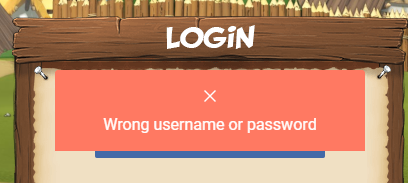
			<p><span data-sheets-value="{&quot;1&quot;:2,&quot;2&quot;:&quot;As announced you will not be able to log in with your old password anymore after the maintenance. An error message will be displayed \&quot;Wrong username or password\&quot;. Don't panic! All you need to do is to reset your password. \n1. Click \&quot;I already have an account\&quot; to get to the log in site.\n2. Click \&quot;Forgot your password?\&quot;.\n3. Enter your email address and click \&quot;Recover password\&quot;.\n4. Check your mail inbox and in the password recovery email click \&quot;Recover password\&quot;\n5. Enter your new password and click \&quot;Set New Password\&quot;\n6. Go back to the log in page and log in with your email address and your new password.&quot;}" data-sheets-userformat="{&quot;2&quot;:897,&quot;3&quot;:{&quot;1&quot;:0},&quot;10&quot;:0,&quot;11&quot;:4,&quot;12&quot;:0}">As announced you will not be able to log in with your old password anymore after the maintenance. An error message will be displayed: &#8220;Wrong username or password&#8221;. Don&#8217;t panic! All you need to do is to reset your password.</span></p>
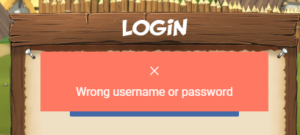
<div id="attachment_3909" style="width: 310px" class="wp-caption alignnone"><a href="https://www.asterix-friends.com/wp-content/uploads/2013/05/1.png" rel="shadowbox[sbpost-424];player=img;"><img aria-describedby="caption-attachment-3909" loading="lazy" class="size-medium wp-image-3909" src="https://www.asterix-friends.com/wp-content/uploads/2013/05/1-300x135.png" alt="Wrong username or password" width="300" height="135" srcset="https://www.asterix-friends.com/wp-content/uploads/2013/05/1-300x135.png 300w, https://www.asterix-friends.com/wp-content/uploads/2013/05/1.png 408w" sizes="(max-width: 300px) 100vw, 300px" /></a><p id="caption-attachment-3909" class="wp-caption-text">Wrong username or password</p></div>
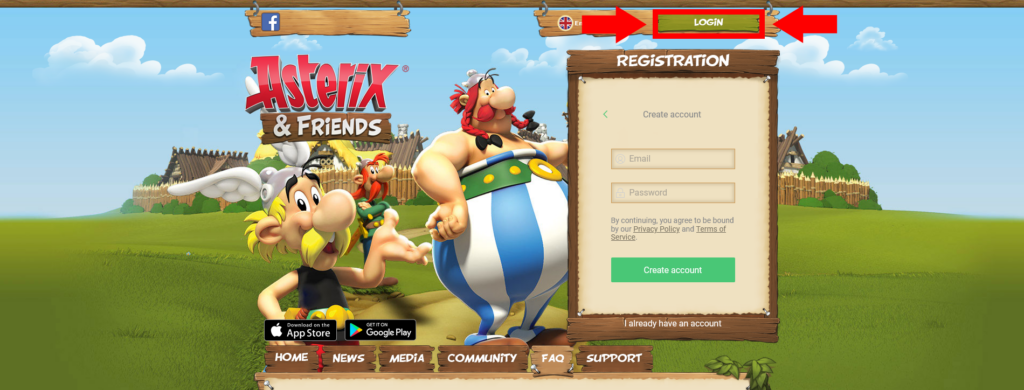
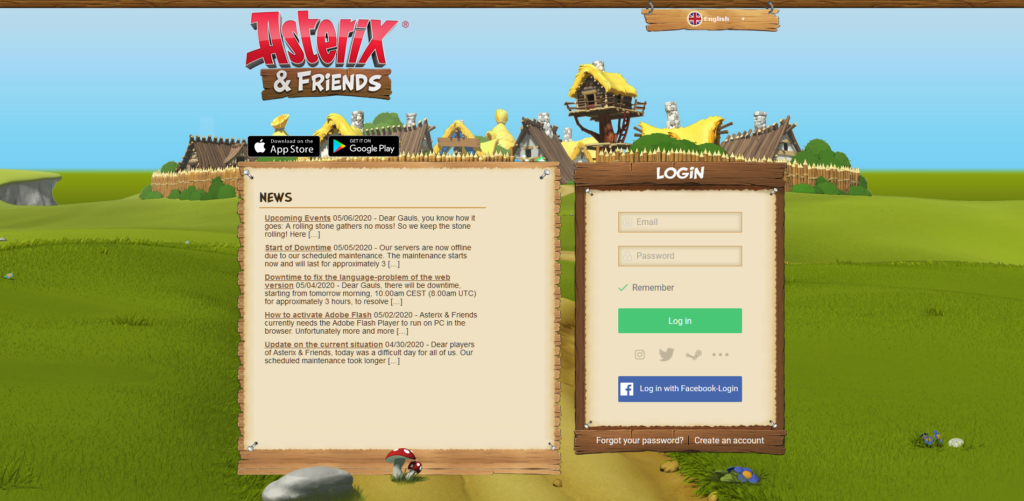
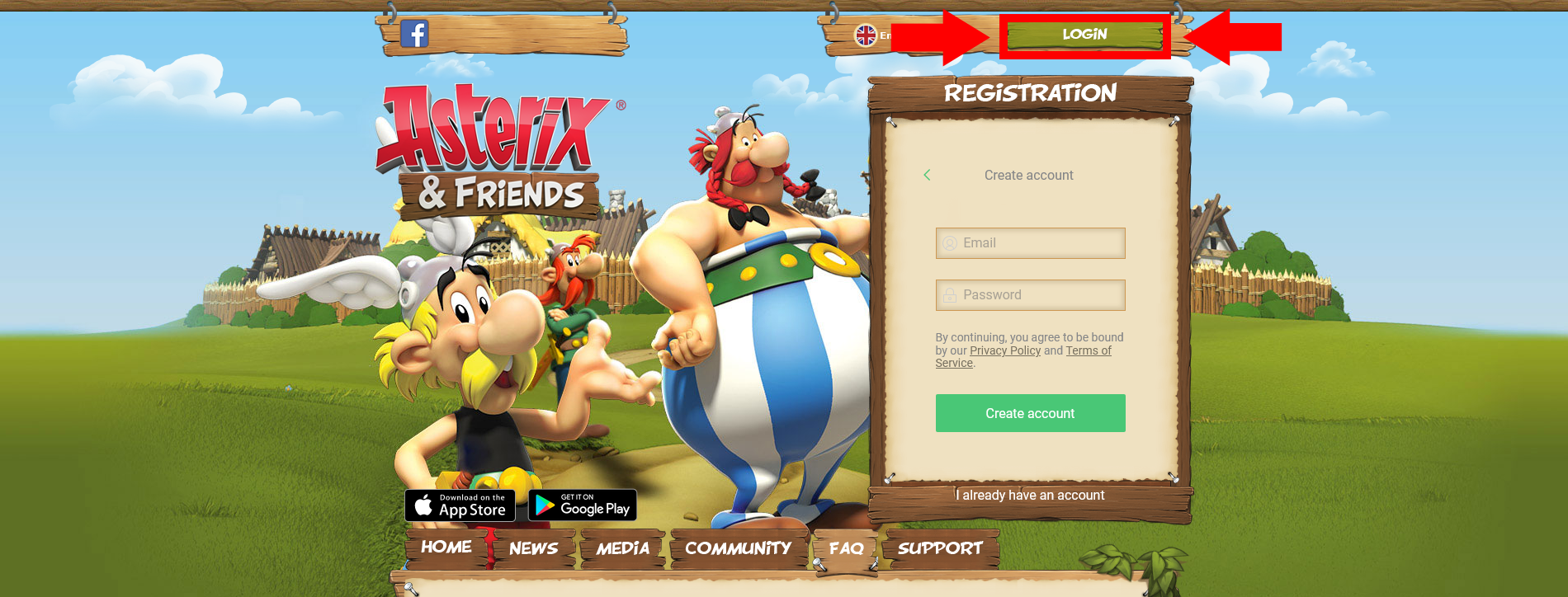
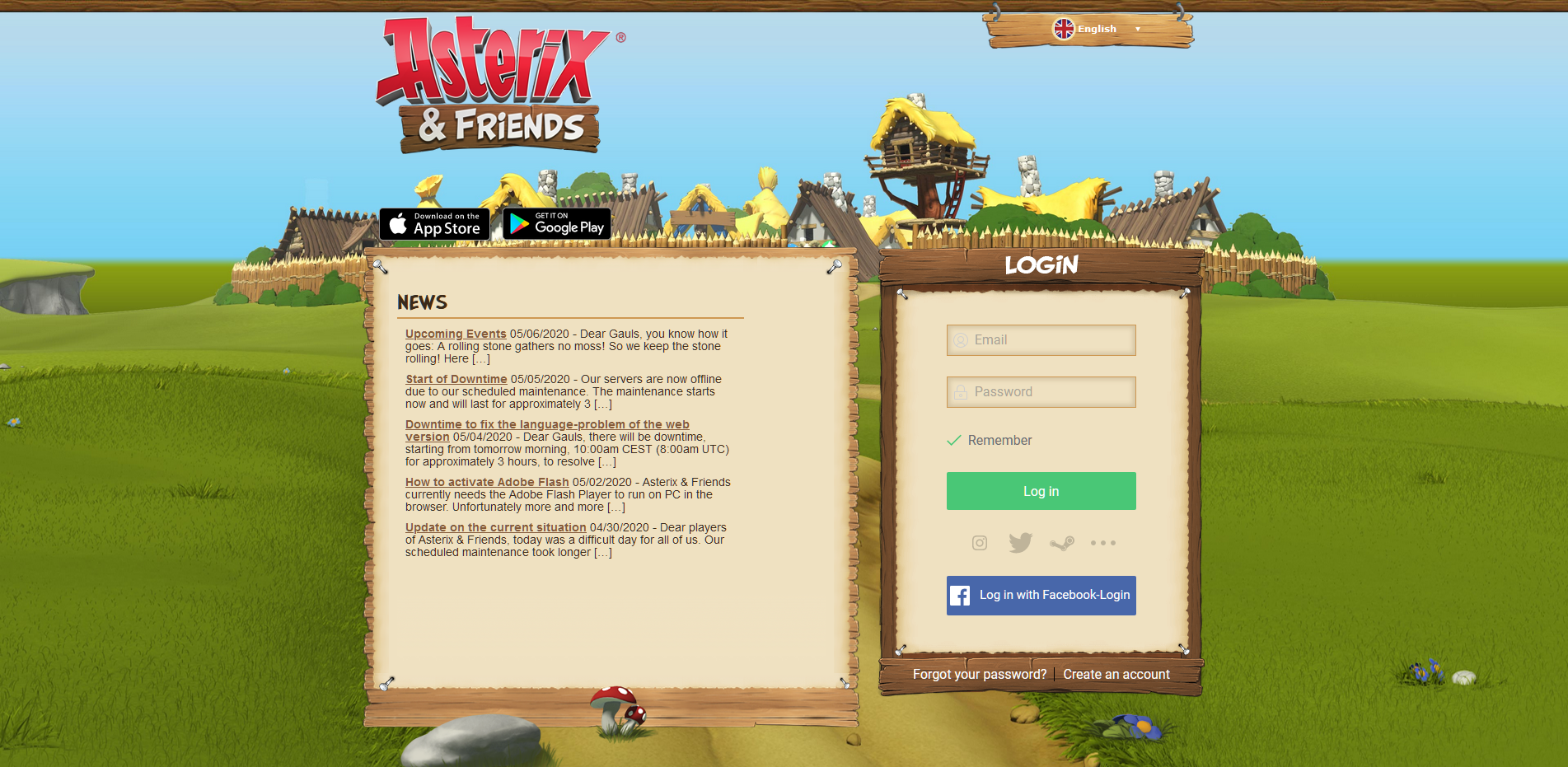
<p><span data-sheets-value="{&quot;1&quot;:2,&quot;2&quot;:&quot;As announced you will not be able to log in with your old password anymore after the maintenance. An error message will be displayed \&quot;Wrong username or password\&quot;. Don't panic! All you need to do is to reset your password. \n1. Click \&quot;I already have an account\&quot; to get to the log in site.\n2. Click \&quot;Forgot your password?\&quot;.\n3. Enter your email address and click \&quot;Recover password\&quot;.\n4. Check your mail inbox and in the password recovery email click \&quot;Recover password\&quot;\n5. Enter your new password and click \&quot;Set New Password\&quot;\n6. Go back to the log in page and log in with your email address and your new password.&quot;}" data-sheets-userformat="{&quot;2&quot;:897,&quot;3&quot;:{&quot;1&quot;:0},&quot;10&quot;:0,&quot;11&quot;:4,&quot;12&quot;:0}">1. Click on the green &#8220;LOGIN&#8221; Button on the mainpage (<a href="https://www.asterix-friends.com">www.asterix-friends.com</a>) to get to the Login Page (</span><a href="https://www.asterix-friends.com/en/login"><span data-sheets-value="{&quot;1&quot;:2,&quot;2&quot;:&quot;As announced you will not be able to log in with your old password anymore after the maintenance. An error message will be displayed \&quot;Wrong username or password\&quot;. Don't panic! All you need to do is to reset your password. \n1. Click \&quot;I already have an account\&quot; to get to the log in site.\n2. Click \&quot;Forgot your password?\&quot;.\n3. Enter your email address and click \&quot;Recover password\&quot;.\n4. Check your mail inbox and in the password recovery email click \&quot;Recover password\&quot;\n5. Enter your new password and click \&quot;Set New Password\&quot;\n6. Go back to the log in page and log in with your email address and your new password.&quot;}" data-sheets-userformat="{&quot;2&quot;:897,&quot;3&quot;:{&quot;1&quot;:0},&quot;10&quot;:0,&quot;11&quot;:4,&quot;12&quot;:0}">www.asterix-friends.com/en/login</span></a><span data-sheets-value="{&quot;1&quot;:2,&quot;2&quot;:&quot;As announced you will not be able to log in with your old password anymore after the maintenance. An error message will be displayed \&quot;Wrong username or password\&quot;. Don't panic! All you need to do is to reset your password. \n1. Click \&quot;I already have an account\&quot; to get to the log in site.\n2. Click \&quot;Forgot your password?\&quot;.\n3. Enter your email address and click \&quot;Recover password\&quot;.\n4. Check your mail inbox and in the password recovery email click \&quot;Recover password\&quot;\n5. Enter your new password and click \&quot;Set New Password\&quot;\n6. Go back to the log in page and log in with your email address and your new password.&quot;}" data-sheets-userformat="{&quot;2&quot;:897,&quot;3&quot;:{&quot;1&quot;:0},&quot;10&quot;:0,&quot;11&quot;:4,&quot;12&quot;:0}">):</span></p>
<div id="attachment_3913" style="width: 635px" class="wp-caption alignnone"><a href="https://www.asterix-friends.com/wp-content/uploads/2013/05/EN_PW_New_1.png" rel="shadowbox[sbpost-424];player=img;"><img aria-describedby="caption-attachment-3913" loading="lazy" class="wp-image-3913 size-large" src="https://www.asterix-friends.com/wp-content/uploads/2013/05/EN_PW_New_1-1024x390.png" alt="Login Button on Main Page" width="625" height="238" srcset="https://www.asterix-friends.com/wp-content/uploads/2013/05/EN_PW_New_1-1024x390.png 1024w, https://www.asterix-friends.com/wp-content/uploads/2013/05/EN_PW_New_1-300x114.png 300w, https://www.asterix-friends.com/wp-content/uploads/2013/05/EN_PW_New_1-768x293.png 768w, https://www.asterix-friends.com/wp-content/uploads/2013/05/EN_PW_New_1-1536x585.png 1536w, https://www.asterix-friends.com/wp-content/uploads/2013/05/EN_PW_New_1-624x238.png 624w, https://www.asterix-friends.com/wp-content/uploads/2013/05/EN_PW_New_1.png 1900w" sizes="(max-width: 625px) 100vw, 625px" /></a><p id="caption-attachment-3913" class="wp-caption-text">The button leading to the login page</p></div>
<div id="attachment_3916" style="width: 635px" class="wp-caption alignnone"><a href="https://www.asterix-friends.com/wp-content/uploads/2013/05/EN_PW_New_2.png" rel="shadowbox[sbpost-424];player=img;"><img aria-describedby="caption-attachment-3916" loading="lazy" class="wp-image-3916 size-large" src="https://www.asterix-friends.com/wp-content/uploads/2013/05/EN_PW_New_2-1024x501.png" alt="The Login Page" width="625" height="306" srcset="https://www.asterix-friends.com/wp-content/uploads/2013/05/EN_PW_New_2-1024x501.png 1024w, https://www.asterix-friends.com/wp-content/uploads/2013/05/EN_PW_New_2-300x147.png 300w, https://www.asterix-friends.com/wp-content/uploads/2013/05/EN_PW_New_2-768x376.png 768w, https://www.asterix-friends.com/wp-content/uploads/2013/05/EN_PW_New_2-1536x751.png 1536w, https://www.asterix-friends.com/wp-content/uploads/2013/05/EN_PW_New_2-624x305.png 624w, https://www.asterix-friends.com/wp-content/uploads/2013/05/EN_PW_New_2.png 1903w" sizes="(max-width: 625px) 100vw, 625px" /></a><p id="caption-attachment-3916" class="wp-caption-text">The Login Page</p></div>
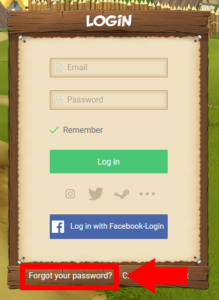
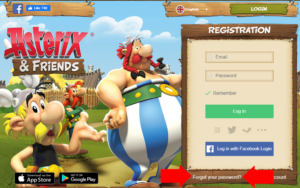
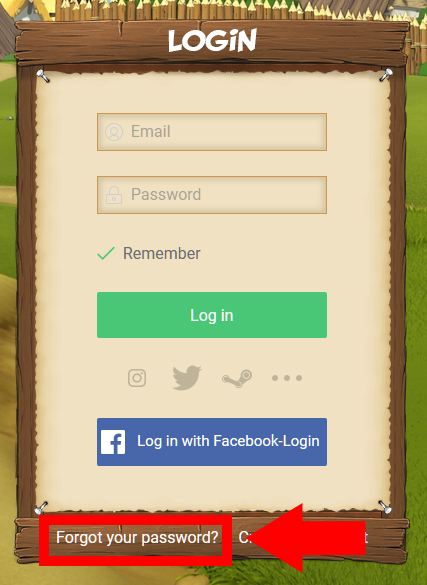
<p><span data-sheets-value="{&quot;1&quot;:2,&quot;2&quot;:&quot;As announced you will not be able to log in with your old password anymore after the maintenance. An error message will be displayed \&quot;Wrong username or password\&quot;. Don't panic! All you need to do is to reset your password. \n1. Click \&quot;I already have an account\&quot; to get to the log in site.\n2. Click \&quot;Forgot your password?\&quot;.\n3. Enter your email address and click \&quot;Recover password\&quot;.\n4. Check your mail inbox and in the password recovery email click \&quot;Recover password\&quot;\n5. Enter your new password and click \&quot;Set New Password\&quot;\n6. Go back to the log in page and log in with your email address and your new password.&quot;}" data-sheets-userformat="{&quot;2&quot;:897,&quot;3&quot;:{&quot;1&quot;:0},&quot;10&quot;:0,&quot;11&quot;:4,&quot;12&quot;:0}">2. Click &#8220;Forgot your password?&#8221; at the bottom left of the LOGIN box.</span></p>
<p><a href="https://www.asterix-friends.com/wp-content/uploads/2013/05/EN_PW_New_3.png" rel="shadowbox[sbpost-424];player=img;"><img loading="lazy" class="alignnone size-medium wp-image-3919" src="https://www.asterix-friends.com/wp-content/uploads/2013/05/EN_PW_New_3-219x300.png" alt="" width="219" height="300" srcset="https://www.asterix-friends.com/wp-content/uploads/2013/05/EN_PW_New_3-219x300.png 219w, https://www.asterix-friends.com/wp-content/uploads/2013/05/EN_PW_New_3.png 427w" sizes="(max-width: 219px) 100vw, 219px" /></a></p>
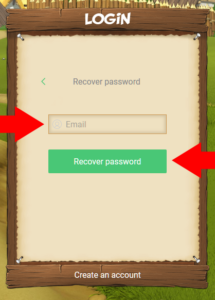
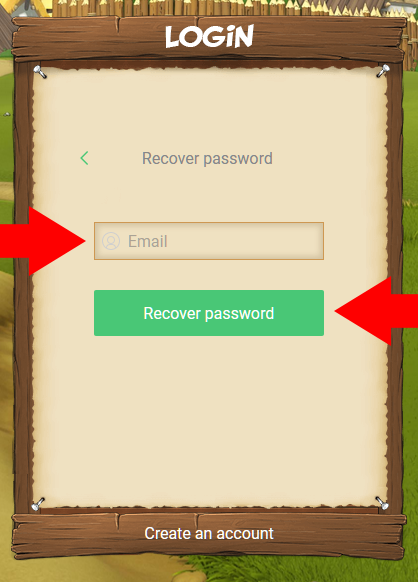
<p><span data-sheets-value="{&quot;1&quot;:2,&quot;2&quot;:&quot;As announced you will not be able to log in with your old password anymore after the maintenance. An error message will be displayed \&quot;Wrong username or password\&quot;. Don't panic! All you need to do is to reset your password. \n1. Click \&quot;I already have an account\&quot; to get to the log in site.\n2. Click \&quot;Forgot your password?\&quot;.\n3. Enter your email address and click \&quot;Recover password\&quot;.\n4. Check your mail inbox and in the password recovery email click \&quot;Recover password\&quot;\n5. Enter your new password and click \&quot;Set New Password\&quot;\n6. Go back to the log in page and log in with your email address and your new password.&quot;}" data-sheets-userformat="{&quot;2&quot;:897,&quot;3&quot;:{&quot;1&quot;:0},&quot;10&quot;:0,&quot;11&quot;:4,&quot;12&quot;:0}">3. Enter your email address and click &#8220;Recover password&#8221;.</span></p>
<p><a href="https://www.asterix-friends.com/wp-content/uploads/2013/05/EN_PW_New_4.png" rel="shadowbox[sbpost-424];player=img;"><img loading="lazy" class="alignnone size-medium wp-image-3922" src="https://www.asterix-friends.com/wp-content/uploads/2013/05/EN_PW_New_4-215x300.png" alt="" width="215" height="300" srcset="https://www.asterix-friends.com/wp-content/uploads/2013/05/EN_PW_New_4-215x300.png 215w, https://www.asterix-friends.com/wp-content/uploads/2013/05/EN_PW_New_4.png 418w" sizes="(max-width: 215px) 100vw, 215px" /></a></p>
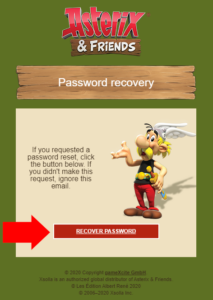
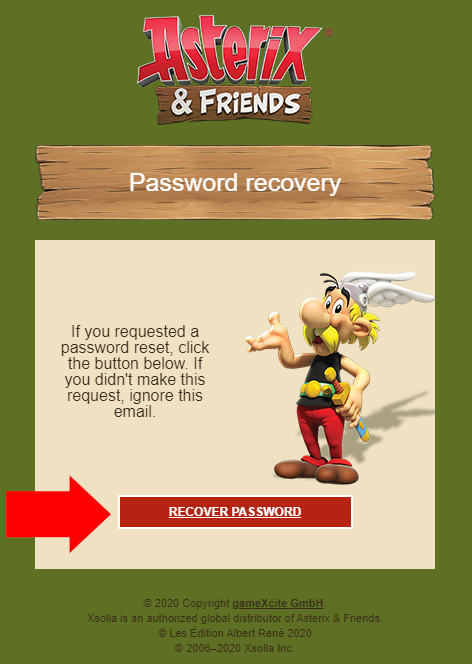
<p><span data-sheets-value="{&quot;1&quot;:2,&quot;2&quot;:&quot;As announced you will not be able to log in with your old password anymore after the maintenance. An error message will be displayed \&quot;Wrong username or password\&quot;. Don't panic! All you need to do is to reset your password. \n1. Click \&quot;I already have an account\&quot; to get to the log in site.\n2. Click \&quot;Forgot your password?\&quot;.\n3. Enter your email address and click \&quot;Recover password\&quot;.\n4. Check your mail inbox and in the password recovery email click \&quot;Recover password\&quot;\n5. Enter your new password and click \&quot;Set New Password\&quot;\n6. Go back to the log in page and log in with your email address and your new password.&quot;}" data-sheets-userformat="{&quot;2&quot;:897,&quot;3&quot;:{&quot;1&quot;:0},&quot;10&quot;:0,&quot;11&quot;:4,&quot;12&quot;:0}">4. Check your mail inbox and in the password recovery email click &#8220;Recover password&#8221;. </span></p>
<p><span data-sheets-value="{&quot;1&quot;:2,&quot;2&quot;:&quot;As announced you will not be able to log in with your old password anymore after the maintenance. An error message will be displayed \&quot;Wrong username or password\&quot;. Don't panic! All you need to do is to reset your password. \n1. Click \&quot;I already have an account\&quot; to get to the log in site.\n2. Click \&quot;Forgot your password?\&quot;.\n3. Enter your email address and click \&quot;Recover password\&quot;.\n4. Check your mail inbox and in the password recovery email click \&quot;Recover password\&quot;\n5. Enter your new password and click \&quot;Set New Password\&quot;\n6. Go back to the log in page and log in with your email address and your new password.&quot;}" data-sheets-userformat="{&quot;2&quot;:897,&quot;3&quot;:{&quot;1&quot;:0},&quot;10&quot;:0,&quot;11&quot;:4,&quot;12&quot;:0}">Please make sure to also check the spam folder of your mail provider. If you use an e-mail program like Outlook or Thunderbird, it might not retrieve mails from the spam folder, depending on your settings. In this case, please also check the spam folder of your e-mail inbox in your browser on the website of your mail provider.&nbsp;</span></p>
<div id="attachment_3925" style="width: 223px" class="wp-caption alignnone"><a href="https://www.asterix-friends.com/wp-content/uploads/2013/05/EN_PW_New_5.png" rel="shadowbox[sbpost-424];player=img;"><img aria-describedby="caption-attachment-3925" loading="lazy" class="size-medium wp-image-3925" src="https://www.asterix-friends.com/wp-content/uploads/2013/05/EN_PW_New_5-213x300.png" alt="Recover Password" width="213" height="300" srcset="https://www.asterix-friends.com/wp-content/uploads/2013/05/EN_PW_New_5-213x300.png 213w, https://www.asterix-friends.com/wp-content/uploads/2013/05/EN_PW_New_5.png 472w" sizes="(max-width: 213px) 100vw, 213px" /></a><p id="caption-attachment-3925" class="wp-caption-text">This button in the e-mail you receive opens the page in your browser to set your new password.</p></div>
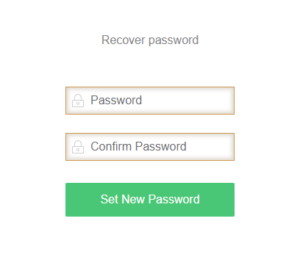
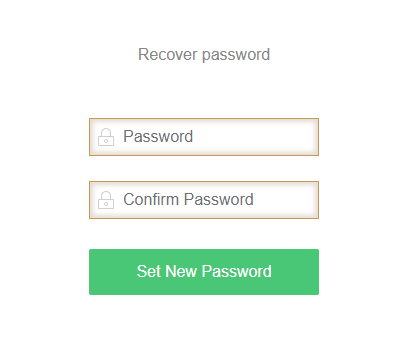
<p><span data-sheets-value="{&quot;1&quot;:2,&quot;2&quot;:&quot;As announced you will not be able to log in with your old password anymore after the maintenance. An error message will be displayed \&quot;Wrong username or password\&quot;. Don't panic! All you need to do is to reset your password. \n1. Click \&quot;I already have an account\&quot; to get to the log in site.\n2. Click \&quot;Forgot your password?\&quot;.\n3. Enter your email address and click \&quot;Recover password\&quot;.\n4. Check your mail inbox and in the password recovery email click \&quot;Recover password\&quot;\n5. Enter your new password and click \&quot;Set New Password\&quot;\n6. Go back to the log in page and log in with your email address and your new password.&quot;}" data-sheets-userformat="{&quot;2&quot;:897,&quot;3&quot;:{&quot;1&quot;:0},&quot;10&quot;:0,&quot;11&quot;:4,&quot;12&quot;:0}">5. Enter your new password and click &#8220;Set New Password&#8221;.</span></p>
<div id="attachment_3928" style="width: 310px" class="wp-caption alignnone"><a href="https://www.asterix-friends.com/wp-content/uploads/2013/05/EN_PW_New_6.png" rel="shadowbox[sbpost-424];player=img;"><img aria-describedby="caption-attachment-3928" loading="lazy" class="size-medium wp-image-3928" src="https://www.asterix-friends.com/wp-content/uploads/2013/05/EN_PW_New_6-300x257.png" alt="Enter your new password" width="300" height="257" srcset="https://www.asterix-friends.com/wp-content/uploads/2013/05/EN_PW_New_6-300x257.png 300w, https://www.asterix-friends.com/wp-content/uploads/2013/05/EN_PW_New_6.png 408w" sizes="(max-width: 300px) 100vw, 300px" /></a><p id="caption-attachment-3928" class="wp-caption-text">Enter your new password in the &#8220;Password&#8221; and &#8220;Confirm Password&#8221; field.</p></div>
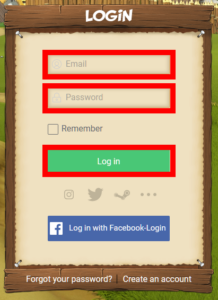
<p><span data-sheets-value="{&quot;1&quot;:2,&quot;2&quot;:&quot;As announced you will not be able to log in with your old password anymore after the maintenance. An error message will be displayed \&quot;Wrong username or password\&quot;. Don't panic! All you need to do is to reset your password. \n1. Click \&quot;I already have an account\&quot; to get to the log in site.\n2. Click \&quot;Forgot your password?\&quot;.\n3. Enter your email address and click \&quot;Recover password\&quot;.\n4. Check your mail inbox and in the password recovery email click \&quot;Recover password\&quot;\n5. Enter your new password and click \&quot;Set New Password\&quot;\n6. Go back to the log in page and log in with your email address and your new password.&quot;}" data-sheets-userformat="{&quot;2&quot;:897,&quot;3&quot;:{&quot;1&quot;:0},&quot;10&quot;:0,&quot;11&quot;:4,&quot;12&quot;:0}">6. Go back to the login page (<a href="https://www.asterix-friends.com/en/login">www.asterix-friends.com/en/login</a>) and log in with your email address and your new password.</span></p>
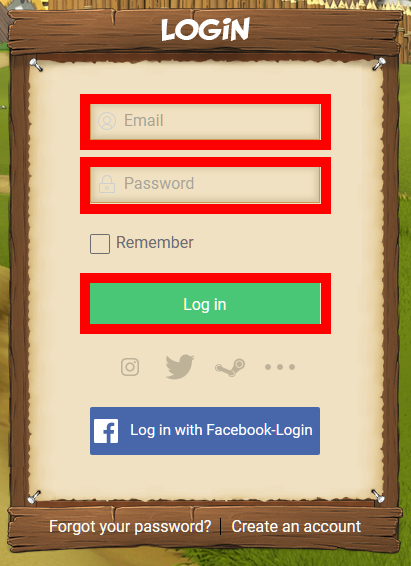
<div id="attachment_3931" style="width: 228px" class="wp-caption alignnone"><a href="https://www.asterix-friends.com/wp-content/uploads/2013/05/EN_PW_New_7.png" rel="shadowbox[sbpost-424];player=img;"><img aria-describedby="caption-attachment-3931" loading="lazy" class="size-medium wp-image-3931" src="https://www.asterix-friends.com/wp-content/uploads/2013/05/EN_PW_New_7-218x300.png" alt="Login" width="218" height="300" srcset="https://www.asterix-friends.com/wp-content/uploads/2013/05/EN_PW_New_7-218x300.png 218w, https://www.asterix-friends.com/wp-content/uploads/2013/05/EN_PW_New_7.png 411w" sizes="(max-width: 218px) 100vw, 218px" /></a><p id="caption-attachment-3931" class="wp-caption-text">Login with your e-mail and the new password.</p></div>
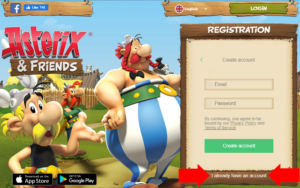
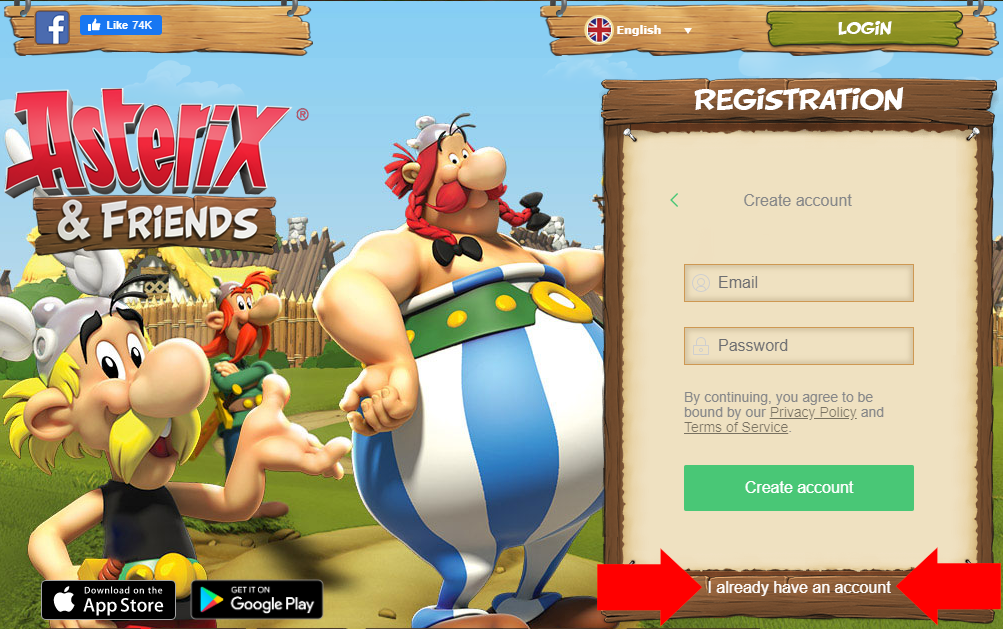
<p><em><strong>Please note:</strong> There is an alternative method to log in. In the main page in the &#8220;Registration&#8221; box, you can switch the box from registration to login by clicking on &#8220;I already have an account&#8221;.&nbsp;</em></p>
<div id="attachment_3934" style="width: 310px" class="wp-caption alignnone"><a href="https://www.asterix-friends.com/wp-content/uploads/2013/05/EN_PW_New_8.png" rel="shadowbox[sbpost-424];player=img;"><img aria-describedby="caption-attachment-3934" loading="lazy" class="size-medium wp-image-3934" src="https://www.asterix-friends.com/wp-content/uploads/2013/05/EN_PW_New_8-300x188.png" alt="Switching from Registration to Login" width="300" height="188" srcset="https://www.asterix-friends.com/wp-content/uploads/2013/05/EN_PW_New_8-300x188.png 300w, https://www.asterix-friends.com/wp-content/uploads/2013/05/EN_PW_New_8-768x482.png 768w, https://www.asterix-friends.com/wp-content/uploads/2013/05/EN_PW_New_8-624x391.png 624w, https://www.asterix-friends.com/wp-content/uploads/2013/05/EN_PW_New_8.png 1003w" sizes="(max-width: 300px) 100vw, 300px" /></a><p id="caption-attachment-3934" class="wp-caption-text">Switching to Login on the Main Page</p></div>
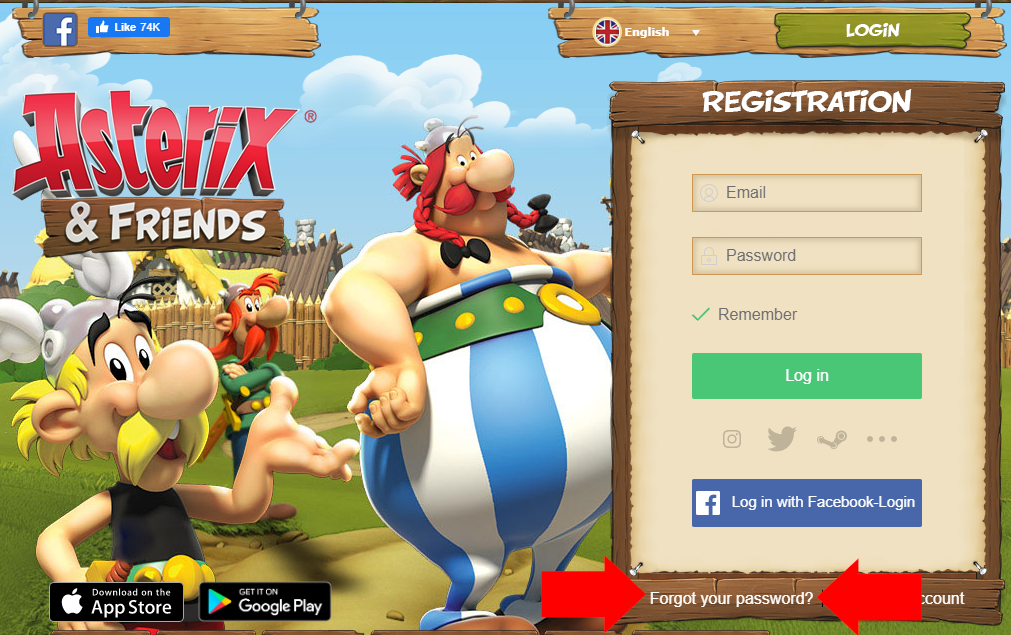
<p><em>The Box will now look just like the Login box on the separate Login Page. Please note though, that the Box will still shows &#8220;Registration&#8221; at the top border. After that, please continue with Step 2 above.</em></p>
<div id="attachment_3937" style="width: 310px" class="wp-caption alignnone"><a href="https://www.asterix-friends.com/wp-content/uploads/2013/05/EN_PW_New_9.png" rel="shadowbox[sbpost-424];player=img;"><img aria-describedby="caption-attachment-3937" loading="lazy" class="size-medium wp-image-3937" src="https://www.asterix-friends.com/wp-content/uploads/2013/05/EN_PW_New_9-300x188.png" alt="Box on Main Page switched to Login" width="300" height="188" srcset="https://www.asterix-friends.com/wp-content/uploads/2013/05/EN_PW_New_9-300x188.png 300w, https://www.asterix-friends.com/wp-content/uploads/2013/05/EN_PW_New_9-768x482.png 768w, https://www.asterix-friends.com/wp-content/uploads/2013/05/EN_PW_New_9-624x392.png 624w, https://www.asterix-friends.com/wp-content/uploads/2013/05/EN_PW_New_9.png 1011w" sizes="(max-width: 300px) 100vw, 300px" /></a><p id="caption-attachment-3937" class="wp-caption-text">The Box has switched to Login and now shows the &#8220;Forgot Password&#8221; button.</p></div>

					</dd>

	
		<dt id="faq-item-476">How can I change the language in the game?</dt>
		<dd>
			<p>You can change the language on&nbsp;<a href="http://www.asterix-and-friends.com/">www.asterix-and-friends.com</a>. With every login it will be changed in the game as well.</p>
<p><img loading="lazy" class="alignnone size-full wp-image-595" src="https://www.asterix-friends.com/wp-content/uploads/2013/08/language_select_en.jpg" alt="sprache_de" width="466" height="157"></p>

					</dd>

	
</dl>

					</dd>

	
		<dt id="faq-item-534">General Questions</dt>
		<dd>
			<dl class="faq faq-list folding-faq-list">

	
	<!-- FAQ List -->
	
		<dt id="faq-item-472">What is Asterix &#038; Friends all about?</dt>
		<dd>
			<p>Asterix &amp; Friends is a free game that you can play together with your friends without any installation or downloading in your browser (e.g. Internet Explorer). In Asterix &amp; Friends you build your own Gaulish village alongside Asterix, Obelix and your villagers and make your stand against the Roman conquerors. For that, you need to gather resources, build houses and accomplish some amazing quests (e.g. boar-hunting) in the world of Asterix &amp; Obelix. To start instantly, just register with your e-Mail address at <a href="http://www.asterix-and-friends.com/">www.asterix-and-friends.com</a>.</p>

					</dd>

	
		<dt id="faq-item-475">What are the technical requirements to play „Asterix &#038; Friends“?</dt>
		<dd>
			<p>There are minimum technical requirements to play Asterix &amp; Friends. Basically, you need an internet connection and a web browser (e.g. Microsoft Edge, Firefox, Chrome).</p>

					</dd>

	
		<dt id="faq-item-477">Is  “Asterix &#038; Friends” for free?</dt>
		<dd>
			<p>Absolutely! Asterix &amp; Friends can be played by everyone for free! But, if you like you can purchase some Roman helmets in the shop in order to progress faster.</p>

					</dd>

	
		<dt id="faq-item-478">Where can I find out more about „Asterix &#038; Friends“?</dt>
		<dd>
			<p>„Asterix &amp; Friends“ is a social game and lives from its players and fans. We provide several platforms where you can get in contact with your friends and other players. Come and visit our forum at <a href="https://www.asterix-friends.com/">www.asterix-friends.com</a> or our Facebook fan page <a href="https://www.facebook.com/AsterixAndFriends">Asterix &amp; Friends FB-Page</a> and get the latest news and amazing background stories about the adventurous world of Asterix &amp; Friends. If you have any questions, our support-team is always at hand.</p>

					</dd>

	
		<dt id="faq-item-1331">How to redeem a code?</dt>
		<dd>
			<p>That is really simple. In game, you&#8217;ll find the market in the bottom right corner. Click the icon.<br />
<img loading="lazy" src="https://www.asterix-friends.com/wp-content/uploads/2013/08/GamesComGutscheinSreen01.png" alt="GamesComGutscheinSreen01" width="300" height="300" class="alignleft size-full wp-image-1328" srcset="https://www.asterix-friends.com/wp-content/uploads/2013/08/GamesComGutscheinSreen01.png 300w, https://www.asterix-friends.com/wp-content/uploads/2013/08/GamesComGutscheinSreen01-150x150.png 150w" sizes="(max-width: 300px) 100vw, 300px" /><br clear="left"/><br />
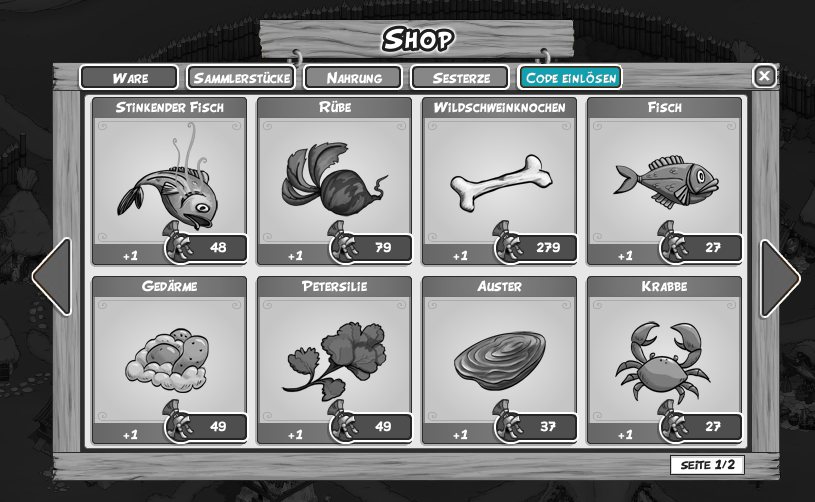
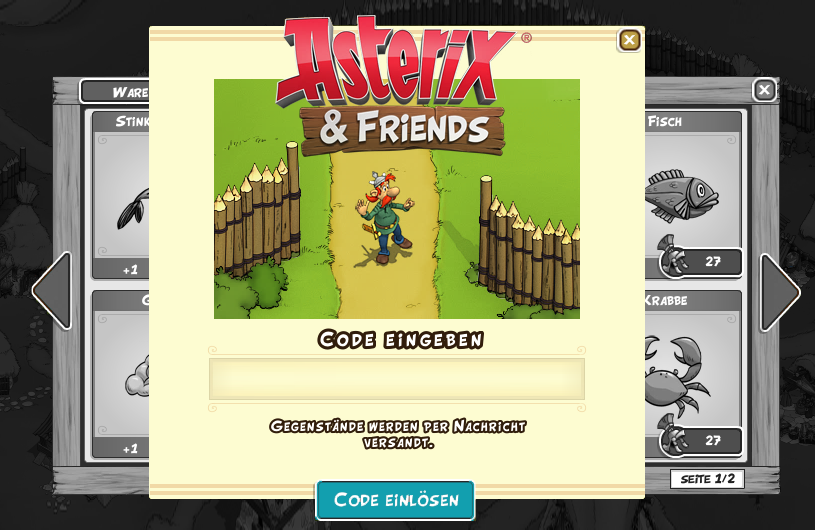
A window will pop up. There you should see a tab labeled REDEEM CODE.<br />
<img loading="lazy" src="https://www.asterix-friends.com/wp-content/uploads/2013/08/GamesComGutscheinSreen02.png" alt="GamesComGutscheinSreen02" width="815" height="502" class="alignleft size-full wp-image-1329" srcset="https://www.asterix-friends.com/wp-content/uploads/2013/08/GamesComGutscheinSreen02.png 815w, https://www.asterix-friends.com/wp-content/uploads/2013/08/GamesComGutscheinSreen02-300x184.png 300w, https://www.asterix-friends.com/wp-content/uploads/2013/08/GamesComGutscheinSreen02-624x384.png 624w" sizes="(max-width: 815px) 100vw, 815px" /><br clear="left"/><br />
Click that tab and in the following window, just enter your code before clicking REDEEM CODE.<br />
<img loading="lazy" src="https://www.asterix-friends.com/wp-content/uploads/2013/08/GamesComGutscheinSreen03.png" alt="GamesComGutscheinSreen03" width="815" height="530" class="alignleft size-full wp-image-1330" srcset="https://www.asterix-friends.com/wp-content/uploads/2013/08/GamesComGutscheinSreen03.png 815w, https://www.asterix-friends.com/wp-content/uploads/2013/08/GamesComGutscheinSreen03-300x195.png 300w, https://www.asterix-friends.com/wp-content/uploads/2013/08/GamesComGutscheinSreen03-624x405.png 624w" sizes="(max-width: 815px) 100vw, 815px" /></p>

					</dd>

	
		<dt id="faq-item-1335">How exactly do spawn times work for the legions?</dt>
		<dd>
			<p>The basic spawn time for legions is 70 hours. There is, however, a random deviation of +/- 4 hours. That means, the base value might be anywhere from 66 to 74 hours.</p>
<p>As soon as you are competing with a legion, the basic spawn time is reduced by 3 minutes for each power point that is being used in fight. That means: if you are using many strength points, the next legion will arrive quicker. If you are not fighting that much, the basic spawn time won&#8217;t deviate much.</p>
<p>Should you be fighting a lot in a short period of time, you will not only face more legions &#8211; the legions will also have more health. This is being visualized in the game by the resistance bar &#8211; the higher your resistance level, the more likely you are to encounter legions with a lot of health.</p>

					</dd>

	
</dl>

					</dd>

	
		<dt id="faq-item-541">Resources</dt>
		<dd>
			<dl class="faq faq-list folding-faq-list">

	
	<!-- FAQ List -->
	
		<dt id="faq-item-479">Which resources are there in „Asterix &#038; Friends“?</dt>
		<dd>
			<p>Most of the time, you will be going for Wood, Stone, Food and Wheat. As the game progresses, other resources get more important. You&#8217;d be surprised of how important chicken can suddenly be.</p>

					</dd>

	
		<dt id="faq-item-480">I am running low on food. What can I do?</dt>
		<dd>
			<p>Head for the southern farm, hunt boar and go fishing regularly. This should stabilize your food rapidly.</p>

					</dd>

	
		<dt id="faq-item-481">I&#8217;m lacking a specific resource. What can I do?</dt>
		<dd>
			<p>Go and send Pointandclix to gather resources. If you hover your mouse over the needed resource, you will see where to get it.</p>

					</dd>

	
		<dt id="faq-item-482">How do I get more villagers?</dt>
		<dd>
			<p>Gauls don&#8217;t like to sleep under an open sky. So do some quests and build them houses.</p>

					</dd>

	
		<dt id="faq-item-483">How do I make my villagers combat-ready?</dt>
		<dd>
			<p>Some villagers have to be convinced to join your resistance, so finish some of the quests they are offering. But most of them are combat-ready as soon as you&#8217;ve built their home. And when you give them spear and shield, they are ready to punch some Romans.</p>

					</dd>

	
		<dt id="faq-item-484">I have received a warning about a Roman legion approaching. What can I do?</dt>
		<dd>
			<p>Click the button “friendsmap” on the right side of the screen. There you can check how strong the attacker is and when he will arrive. Now go for it and hunt him down, before he reaches your village.</p>
<p><img loading="lazy" class="alignnone size-full wp-image-569" alt="UI_Freundeskarte_EN" src="https://www.asterix-friends.com/wp-content/uploads/2013/05/UI_Freundeskarte_EN.jpg" width="262" height="164" /><img loading="lazy" class="alignnone size-full wp-image-581" alt="Belagerungsanzeige_EN" src="https://www.asterix-friends.com/wp-content/uploads/2013/05/Belagerungsanzeige_EN.jpg" width="238" height="156" /></p>

					</dd>

	
		<dt id="faq-item-485">I logged in and all patrols were back. What happened?</dt>
		<dd>
			<p>Rome is taking your resistance very seriously and sends legion after legion at you. You will have to get used to the fact that you will be forced to deal with Roman legions and patrols right in your backyard.</p>

					</dd>

	
		<dt id="faq-item-486">What are resistance points good for?</dt>
		<dd>
			<p>You can train your villagers with resistance points to make them stronger.</p>

					</dd>

	
		<dt id="faq-item-487">How do I add a friend to my friend list?</dt>
		<dd>
			<p>You can search for your friend&#8217;s name on the friendsmap. As soon as he has accepted your invitation you are allied in your fight against the Romans.</p>

					</dd>

	
		<dt id="faq-item-488">How can I send a present to another player?</dt>
		<dd>
			<p>You only have to open your inventory on the right side of the screen, then click on the item and choose „Present“.</p>
<p><img loading="lazy" class="alignnone size-full wp-image-572" alt="UI_Inventar_EN" src="https://www.asterix-friends.com/wp-content/uploads/2013/05/UI_Inventar_EN.jpg" width="224" height="172" /></p>

					</dd>

	
</dl>

					</dd>

	
		<dt id="faq-item-533">Buildings</dt>
		<dd>
			<dl class="faq faq-list folding-faq-list">

	
	<!-- FAQ List -->
	
		<dt id="faq-item-489">Why can´t I place buildings completely free?</dt>
		<dd>
			<p>You will notice that there are different building slots, a big one for production buildings and a smaller one for residential houses.</p>
<p><img loading="lazy" class="alignnone size-full wp-image-586" alt="Baugrund_Wohngebaeude_EN" src="https://www.asterix-friends.com/wp-content/uploads/2013/05/Baugrund_Wohngebaeude_EN.jpg" width="316" height="108" srcset="https://www.asterix-friends.com/wp-content/uploads/2013/05/Baugrund_Wohngebaeude_EN.jpg 316w, https://www.asterix-friends.com/wp-content/uploads/2013/05/Baugrund_Wohngebaeude_EN-300x102.jpg 300w" sizes="(max-width: 316px) 100vw, 316px" /><img loading="lazy" class="alignnone size-full wp-image-589" alt="Baugrund_Produktionsgebaeude_EN" src="https://www.asterix-friends.com/wp-content/uploads/2013/05/Baugrund_Produktionsgebaeude_EN.jpg" width="320" height="118" srcset="https://www.asterix-friends.com/wp-content/uploads/2013/05/Baugrund_Produktionsgebaeude_EN.jpg 320w, https://www.asterix-friends.com/wp-content/uploads/2013/05/Baugrund_Produktionsgebaeude_EN-300x110.jpg 300w" sizes="(max-width: 320px) 100vw, 320px" /></p>

					</dd>

	
</dl>

					</dd>

	
		<dt id="faq-item-539">Quests</dt>
		<dd>
			<dl class="faq faq-list folding-faq-list">

	
	<!-- FAQ List -->
	
		<dt id="faq-item-491">What different quests are there in „Asterix &#038; Friends“?</dt>
		<dd>
			<p>This can vary widely. Some quests demand a specific amount of (for example) stone. Other quest givers want you to punch Romans, collect wheat or bring boar leather to your village.</p>

					</dd>

	
</dl>

					</dd>

	
		<dt id="faq-item-532">Battles</dt>
		<dd>
			<dl class="faq faq-list folding-faq-list">

	
	<!-- FAQ List -->
	
		<dt id="faq-item-492">How do I fight against the romans?</dt>
		<dd>
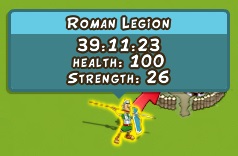
			{"id":424,"date":"2013-05-06T18:44:33","date_gmt":"2013-05-06T16:44:33","guid":{"rendered":"https:\/\/www.asterix-friends.com\/?page_id=424"},"modified":"2014-12-16T13:43:02","modified_gmt":"2014-12-16T11:43:02","slug":"faq","status":"publish","type":"page","link":"https:\/\/www.asterix-friends.com\/en\/faq\/","title":{"rendered":"FAQ"},"content":{"rendered":"<h2 class=\"entry-title\">FAQ<\/h2>\n<p>The fight against the Romans is divided into two areas. First of all, it is important to crush all the Roman legions and patrols around your village, so you can reach the important buildings like the southern farm or the stone pit.<\/p>\n<p>But, Rome is not your friend and is constantly sending legions against you. It will be your task to defeat them before they reach your village.<\/p>\n<p>It is important to know that a legion always has some life points and strength. Life points indicate the entire strength of the legion . The strength defines how strong your villagers have to be in order to even have a chance of winning against the Romans.<\/p>\n<p><img loading=\"lazy\" class=\"alignnone size-full wp-image-581\" alt=\"Belagerungsanzeige_EN\" src=\"https:\/\/www.asterix-friends.com\/wp-content\/uploads\/2013\/05\/Belagerungsanzeige_EN.jpg\" width=\"238\" height=\"156\" \/><\/p>\n<p>In this example, you can see that you and your friends need to carry off 100 life points by always bringing at least a strength of 26 to the battlefield.<\/p>\n<p>The same system is used in the village view. If you hover over a patrol or a legion, you will see the strength you have to defeat. If your villagers are lower than the strength of your opponent, it is not recommended to start a fight.<\/p>\n<p><a href=\"https:\/\/www.asterix-friends.com\/?attachment_id=584\" rel=\"attachment wp-att-584\"><img loading=\"lazy\" class=\"alignnone size-full wp-image-584\" alt=\"Patrouillenanzeige_EN\" src=\"https:\/\/www.asterix-friends.com\/wp-content\/uploads\/2013\/05\/Patrouillenanzeige_EN.jpg\" width=\"400\" height=\"450\" srcset=\"https:\/\/www.asterix-friends.com\/wp-content\/uploads\/2013\/05\/Patrouillenanzeige_EN.jpg 400w, https:\/\/www.asterix-friends.com\/wp-content\/uploads\/2013\/05\/Patrouillenanzeige_EN-266x300.jpg 266w\" sizes=\"(max-width: 400px) 100vw, 400px\" \/><\/a><\/p>\n\r\n\t\t\t\t\t<\/dd>\r\n\r\n\t\r\n<\/dl>\n\r\n\t\t\t\t\t<\/dd>\r\n\r\n\t\r\n<\/dl>\n","protected":false},"excerpt":{"rendered":"<p>FAQ<\/p>\n","protected":false},"author":23,"featured_media":0,"parent":0,"menu_order":9,"comment_status":"closed","ping_status":"closed","template":"page-templates\/support.php","meta":{"ngg_post_thumbnail":0},"acf":[],"yoast_head":"<!-- This site is optimized with the Yoast SEO plugin v19.3 - https:\/\/yoast.com\/wordpress\/plugins\/seo\/ -->\n<title>FAQ - Asterix &amp; Friends - Official Website<\/title>\n<meta name=\"robots\" content=\"index, follow, max-snippet:-1, max-image-preview:large, max-video-preview:-1\" \/>\n<link rel=\"canonical\" href=\"https:\/\/www.asterix-friends.com\/en\/faq\/\" \/>\n<script type=\"application\/ld+json\" class=\"yoast-schema-graph\">{\"@context\":\"https:\/\/schema.org\",\"@graph\":[{\"@type\":\"WebSite\",\"@id\":\"https:\/\/www.asterix-friends.com\/de\/#website\",\"url\":\"https:\/\/www.asterix-friends.com\/de\/\",\"name\":\"Asterix &amp; Friends - Official Website\",\"description\":\"Asterix &amp; Friends - the official Online and Mobile Game\",\"potentialAction\":[{\"@type\":\"SearchAction\",\"target\":{\"@type\":\"EntryPoint\",\"urlTemplate\":\"https:\/\/www.asterix-friends.com\/de\/?s={search_term_string}\"},\"query-input\":\"required name=search_term_string\"}],\"inLanguage\":\"en-US\"},{\"@type\":\"WebPage\",\"@id\":\"https:\/\/www.asterix-friends.com\/en\/faq\/\",\"url\":\"https:\/\/www.asterix-friends.com\/en\/faq\/\",\"name\":\"FAQ - Asterix &amp; Friends - Official Website\",\"isPartOf\":{\"@id\":\"https:\/\/www.asterix-friends.com\/de\/#website\"},\"datePublished\":\"2013-05-06T16:44:33+00:00\",\"dateModified\":\"2014-12-16T11:43:02+00:00\",\"breadcrumb\":{\"@id\":\"https:\/\/www.asterix-friends.com\/en\/faq\/#breadcrumb\"},\"inLanguage\":\"en-US\",\"potentialAction\":[{\"@type\":\"ReadAction\",\"target\":[\"https:\/\/www.asterix-friends.com\/en\/faq\/\"]}]},{\"@type\":\"BreadcrumbList\",\"@id\":\"https:\/\/www.asterix-friends.com\/en\/faq\/#breadcrumb\",\"itemListElement\":[{\"@type\":\"ListItem\",\"position\":1,\"name\":\"Home\",\"item\":\"https:\/\/www.asterix-friends.com\/en\/\"},{\"@type\":\"ListItem\",\"position\":2,\"name\":\"FAQ\"}]}]}<\/script>\n<!-- \/ Yoast SEO plugin. -->","yoast_head_json":{"title":"FAQ - Asterix &amp; Friends - Official Website","robots":{"index":"index","follow":"follow","max-snippet":"max-snippet:-1","max-image-preview":"max-image-preview:large","max-video-preview":"max-video-preview:-1"},"canonical":"https:\/\/www.asterix-friends.com\/en\/faq\/","schema":{"@context":"https:\/\/schema.org","@graph":[{"@type":"WebSite","@id":"https:\/\/www.asterix-friends.com\/de\/#website","url":"https:\/\/www.asterix-friends.com\/de\/","name":"Asterix &amp; Friends - Official Website","description":"Asterix &amp; Friends - the official Online and Mobile Game","potentialAction":[{"@type":"SearchAction","target":{"@type":"EntryPoint","urlTemplate":"https:\/\/www.asterix-friends.com\/de\/?s={search_term_string}"},"query-input":"required name=search_term_string"}],"inLanguage":"en-US"},{"@type":"WebPage","@id":"https:\/\/www.asterix-friends.com\/en\/faq\/","url":"https:\/\/www.asterix-friends.com\/en\/faq\/","name":"FAQ - Asterix &amp; Friends - Official Website","isPartOf":{"@id":"https:\/\/www.asterix-friends.com\/de\/#website"},"datePublished":"2013-05-06T16:44:33+00:00","dateModified":"2014-12-16T11:43:02+00:00","breadcrumb":{"@id":"https:\/\/www.asterix-friends.com\/en\/faq\/#breadcrumb"},"inLanguage":"en-US","potentialAction":[{"@type":"ReadAction","target":["https:\/\/www.asterix-friends.com\/en\/faq\/"]}]},{"@type":"BreadcrumbList","@id":"https:\/\/www.asterix-friends.com\/en\/faq\/#breadcrumb","itemListElement":[{"@type":"ListItem","position":1,"name":"Home","item":"https:\/\/www.asterix-friends.com\/en\/"},{"@type":"ListItem","position":2,"name":"FAQ"}]}]}},"_links":{"self":[{"href":"https:\/\/www.asterix-friends.com\/en\/wp-json\/wp\/v2\/pages\/424"}],"collection":[{"href":"https:\/\/www.asterix-friends.com\/en\/wp-json\/wp\/v2\/pages"}],"about":[{"href":"https:\/\/www.asterix-friends.com\/en\/wp-json\/wp\/v2\/types\/page"}],"author":[{"embeddable":true,"href":"https:\/\/www.asterix-friends.com\/en\/wp-json\/wp\/v2\/users\/23"}],"replies":[{"embeddable":true,"href":"https:\/\/www.asterix-friends.com\/en\/wp-json\/wp\/v2\/comments?post=424"}],"version-history":[{"count":7,"href":"https:\/\/www.asterix-friends.com\/en\/wp-json\/wp\/v2\/pages\/424\/revisions"}],"predecessor-version":[{"id":2470,"href":"https:\/\/www.asterix-friends.com\/en\/wp-json\/wp\/v2\/pages\/424\/revisions\/2470"}],"wp:attachment":[{"href":"https:\/\/www.asterix-friends.com\/en\/wp-json\/wp\/v2\/media?parent=424"}],"curies":[{"name":"wp","href":"https:\/\/api.w.org\/{rel}","templated":true}]}}